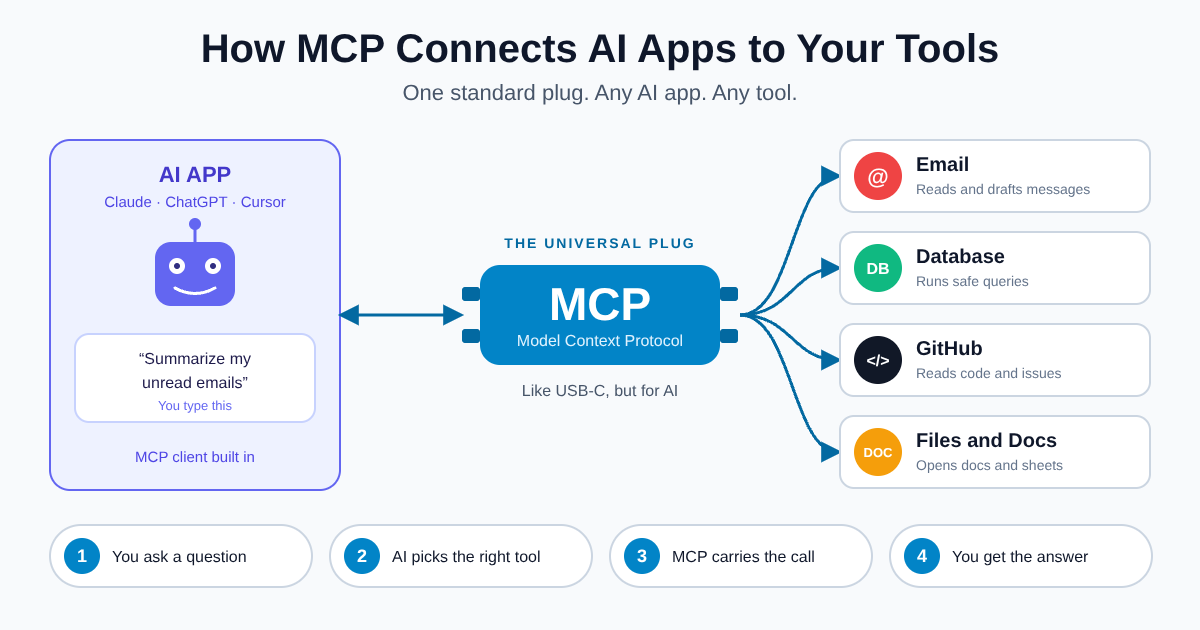
You tell your AI assistant, "Summarize my unread emails and add every deadline to my calendar." A minute later it's done. The assistant didn't guess, and nobody wrote a one-off script for your inbox. It used a shared standard called the Model Context Protocol (MCP).
The Model Context Protocol is a big reason AI agents have moved from talking about your work to actually doing it. Since Anthropic introduced it in November 2024, it has become the common way AI apps reach tools, files and databases. In this guide you'll learn what the Model Context Protocol is, how it works, how it differs from APIs and function calling, what changed in the latest 2026-07-28 specification, and which security risks to watch for.
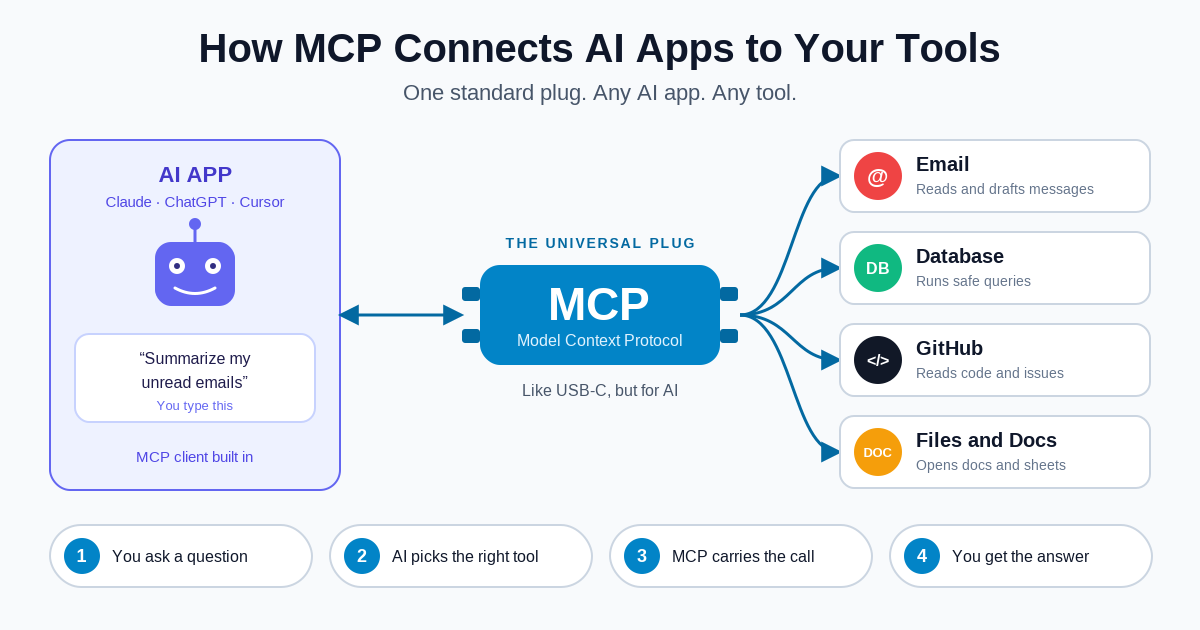
How the Model Context Protocol connects AI apps to your tools: one standard plug, any AI app, any tool.
Last updated: November 24, 2026.
What Is the Model Context Protocol (MCP)?
The Model Context Protocol (MCP) is an open standard that defines how an AI application exchanges information and actions with outside systems. It is a protocol, not a piece of software you install. Any app and any tool that both follow the rules can work together.
The easiest way to picture it is a USB-C port for AI. USB-C gives every device one standard way to plug into chargers, screens and drives. MCP gives every AI app one standard way to plug into email, databases, code repositories and file storage.
The Model Context Protocol started at Anthropic and is now governed in the open. In December 2025, Anthropic donated it to the Agentic AI Foundation (AAIF), a directed fund under the Linux Foundation, co-founded by Anthropic, Block and OpenAI and backed by Google, Microsoft, AWS, Cloudflare and Bloomberg. That neutral home is a big part of why companies feel safe building on it.
Why the Model Context Protocol Exists: The Problem It Solves
Before MCP, every AI app needed its own custom connector for every tool. Want one assistant to read Gmail, query a database and open GitHub issues? That meant three separate integrations. Want five AI apps to reach eight tools? That's 5 × 8 = 40 integrations to build and maintain.
With the Model Context Protocol, each tool gets one MCP server and each AI app gets one MCP client. The same setup now needs only 5 + 8 = 13 pieces, and every new tool or app plugs in without touching the others. That is the whole idea: replace a tangle of one-off connections with one shared language.
For developers, this means fewer custom connectors and more reusable work. For everyday users, it means AI assistants that can reach beyond their training data and work with live files, apps and information.
How the Model Context Protocol Works: Host, Client and Server
The Model Context Protocol uses a simple client-server design with three roles.
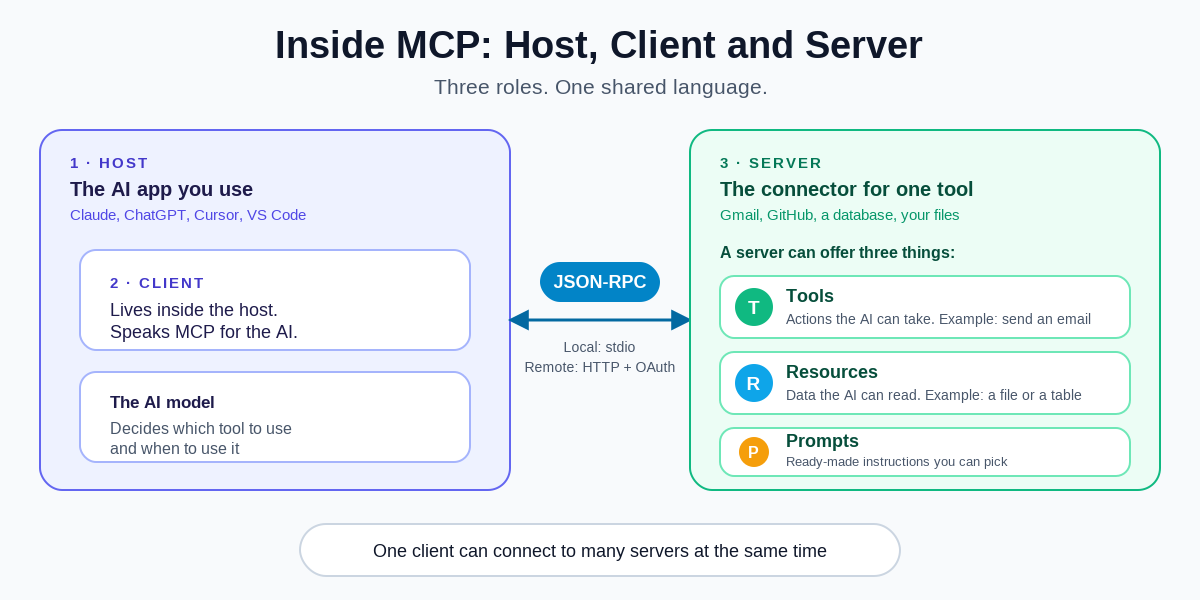
Model Context Protocol architecture: the host contains the client, and the client talks to one or more servers.
Host: the AI app you actually use, such as Claude Desktop, Cursor or an AI coding assistant. It contains the AI model.
Client: a component inside the host that speaks MCP. Each client keeps a connection to one MCP server, and one host can run many clients at once.
Server: a small program that wraps one tool or data source (Gmail, GitHub, a database, your files) and exposes it in the MCP format.
Clients and servers exchange messages using JSON-RPC, a lightweight request-and-response format. There are two common ways to carry those messages:
Local servers (stdio): the host starts the server on your own computer and talks to it through standard input and output. This is the simplest setup.
Remote servers (Streamable HTTP): the client connects over the internet, and OAuth is used to authorize access to your account's resources.
Tools: actions the AI can take, like "send an email" or "create a GitHub issue". The model can discover and call these on its own.
Resources: data the AI can read, like a file, a database table or a document.
Prompts: ready-made instruction templates that guide how the model handles a common task.
How an AI Agent Uses the Model Context Protocol, Step by Step
Here is what happens behind the scenes when you ask, "What's in my unread emails?"
Connect and discover. The client connects to the email MCP server and asks what it offers. The server replies with its list of tools, such as search_emails and read_email, each with a plain-language description.
The AI chooses a tool. The model reads your request and those descriptions, then decides which tool fits.
The client sends the request. The client turns the model's choice into a structured MCP call and sends it to the server.
The server does the work. The server talks to the real email service, gets the data and returns the result in a standard format.
The AI answers you. The model reads the result and writes your summary. If more steps are needed, it repeats the loop.
This is how the Model Context Protocol gives autonomous AI agents their hands: the model supplies the thinking, and MCP supplies a safe, standard way to act on the world.
Building a server is easier than most people expect. Here is a minimal Python example that gives an AI app one tool: counting words in a piece of text.
from mcp.server.fastmcp import FastMCP

mcp = FastMCP("word-counter")

@mcp.tool()
def count_words(text: str) -> int:
    """Count the words in a piece of text."""
    return len(text.split())

if __name__ == "__main__":
    mcp.run()
The line in triple quotes matters more than it looks. It is the tool's description, and it is what the AI reads to decide when to use the tool. Clear descriptions lead to better tool choices. SDK imports can change between major versions, so always check the official Model Context Protocol documentation for the current setup.
Model Context Protocol vs Function Calling vs REST APIs
These three get compared constantly, but they sit at different layers.
| Feature | Function calling | Model Context Protocol (MCP) | REST API |
|---|
| What it is | A model feature for requesting a function call | An open protocol for discovering and calling tools | A standard way for software to talk to a service |
| Who defines tools | Your app, with every request | The server publishes them; clients discover them | Fixed endpoints you code against |
| Works across AI models | No, formats differ by provider | Yes, any MCP client can use any MCP server | Not AI-aware by itself |
| Best for | Simple, single-model apps | Tools shared across apps, teams or models | Stable, high-traffic services |
MCP and function calling work together. MCP standardizes how tools are discovered and invoked, while function calling is still how the model itself asks for a tool. Many MCP setups use the model provider's tool-use feature under the hood.
The Model Context Protocol does not replace REST APIs. Most MCP servers simply wrap an existing API, adding an AI-friendly layer on top. A practical rule from developers: keep core services on REST, and use MCP at the boundary where an AI agent needs to discover and use capabilities. If you are building a tool that only one AI model will ever use, plain function calling is fine. If you want it to work across many AI apps, MCP is the better investment.
How Big Is the Model Context Protocol Today?
The growth of the Model Context Protocol has been fast, though exact numbers vary depending on who is counting and how.
Adoption now spans the biggest names in AI and cloud. The AAIF launch in December 2025 was backed by Anthropic, OpenAI, Block, Google, Microsoft, AWS, Cloudflare and Bloomberg, and the Linux Foundation announcement called MCP the universal standard for connecting AI models to tools, data and applications.
What's New in the 2026-07-28 Model Context Protocol Specification
The current Model Context Protocol specification is version 2026-07-28, published on July 28, 2026. Cloud providers describe it as the largest revision since MCP launched, and it includes backward-incompatible changes. Here is the plain-English version of the main updates, based on the official changelog and the MCP release post.
Stateless by default. The old "handshake" at the start of every connection and the session ID header are gone. Each request now carries its own protocol version and client details, so servers no longer need to remember who you are between calls. That makes remote servers much easier to scale across many machines.
Header-based routing. Method and tool names now travel in HTTP headers, so gateways and firewalls can route and authorize requests without opening the message body.
A formal extensions framework. Optional features such as Tasks, MCP Apps and Enterprise Managed Authorization now live in a governed system instead of being bolted on.
Stronger authorization. The spec adds issuer validation and moves away from Dynamic Client Registration toward client metadata documents, aligning the Model Context Protocol more closely with enterprise OAuth practices.
Upgrading is opt-in. Clients choose a version on every request, so a server that supports both the new and older versions keeps working for clients that haven't moved yet.
Model Context Protocol Security: What Can Go Wrong
The Model Context Protocol lets an AI model take real actions, so security matters. Researchers have already mapped the main risks.
Tool poisoning is a form of indirect prompt injection. An attacker hides malicious instructions inside a tool's description or parameters, where the AI reads them but you may never see them. A 2026 academic study tested seven popular MCP clients (Claude Desktop, Claude Code, Cursor, Cline, Continue, Gemini CLI and Langflow) and found significant weaknesses in most of them, mainly because tool descriptions weren't validated well and parameters weren't clearly visible to users.
Security researchers at Elastic point out that a local MCP server can execute commands directly on your computer, which raises the system-level risk. Remote servers mostly raise data-access concerns instead.
Industry research suggests around half of MCP servers still rely on static credentials, and many are built without scoped permissions. A server with broad access can do a lot of damage if the AI is tricked.
Install only MCP servers from sources you trust, and read what a server can do before you connect it.
Give every server the minimum permissions it needs (least privilege).
Keep secrets in environment variables or a secrets vault, and never commit config files that contain credentials.
Require your approval before risky actions such as sending messages, spending money or deleting data.
Keep tool lists small and well described. Fewer, well-designed tools tend to work better than many granular ones, and long tool lists use up the model's context window.
Real-World Model Context Protocol Use Cases
Coding assistants: an AI coding tool reads your repository, checks issues and queries a database through MCP servers, so it works with real project context.
Business and data work: an assistant searches company documents, pulls figures from a database and drafts a report without anyone exporting files by hand.
Customer support: an agent looks up an order, checks policy and updates a ticket across several systems from one conversation.
Content and publishing: this very blog runs an MCP server, so an AI assistant can list posts, run SEO checks and save drafts straight into the publishing platform.
If you want to see how these tools fit into the bigger picture of autonomous software, read our guide to agentic AI and how autonomous AI agents work. And because AI search engines increasingly decide which pages get cited, our complete guide to generative engine optimization (GEO) shows how to make content like this easy for them to quote.
How to Get Started with the Model Context Protocol
Open the settings of an MCP-capable AI app and look for a connectors, tools or MCP section.
Start with one trusted, read-only server, such as a file or documentation server.
Ask a real question and watch which tool the AI chooses and what it asks permission to do.
Add write access only after you are comfortable, and keep approvals switched on.
Pick an official SDK (Python and TypeScript were there from the start, and SDKs now exist for other major languages).
Build one small server with one or two tools, like the word counter above.
Write clear tool descriptions and test with a real AI app.
Add authentication and least-privilege permissions before sharing the server with anyone.
Check which protocol version your server and clients support, since the 2026-07-28 spec changed how connections work.
Conclusion: The Model Context Protocol Is the Plug That Makes AI Agents Useful
The Model Context Protocol solves a simple but expensive problem: every AI app needed its own connection to every tool. By giving the industry one open standard, now governed by the Linux Foundation, MCP lets developers build a connector once and use it everywhere.
It is not magic. It sits on top of APIs rather than replacing them, and it introduces real security risks that need careful permissions and trusted servers. But for anyone building or using AI agents, understanding the Model Context Protocol is quickly becoming as basic as understanding how websites use HTTP.
Over to you: Have you connected an MCP server to your AI assistant yet, or are you thinking of building one? Share your experience in the comments, send this guide to a developer friend who keeps hearing about MCP, and subscribe for more practical guides on AI, SEO and web development.
Anthropic: Donating the Model Context Protocol and establishing the Agentic AI Foundation (December 2025)
Linux Foundation: Formation of the Agentic AI Foundation (AAIF) (December 9, 2025)
Model Context Protocol: Key changes in the 2026-07-28 specification
Model Context Protocol blog: The 2026-07-28 Specification (July 28, 2026)
Official Model Context Protocol documentation
Cloudflare Developers: Model Context Protocol (MCP)
arXiv: Model Context Protocol Threat Modeling and Analyzing Vulnerabilities to Prompt Injection with Tool Poisoning (March 2026)
Elastic Security Labs: MCP Tools, Attack Vectors and Defense Recommendations for Autonomous Agents
Nordic APIs: 10 Interesting MCP Statistics
DEV Community (gentic.news): MCP hits 10K servers and 97M monthly SDK downloads